
*Download the free trial version of EDB to PST tool to scan & preview your converted mailbox items as PSTs.
Converter for EDB
Convert Microsoft Exchange EDB file to an Outlook importable PST using Stellar Converter for EDB. Compatible with Windows 10, 8, 7, Vista, 2003, and XP, this adroit tool is capable of performing both online and offline conversion.
Supporting all major versions of MS Exchange for EDB conversion, this Converter for EDB preserves the formatting of the RTF and HTML messages after the conversion. In addition, this EDB to PST conversion software works fine with various versions of MS Exchange Server including the latest Exchange Server 2019.
*Download the free trial version of EDB to PST tool to scan & preview your converted mailbox items as PSTs.
Key Features

Convert Exchange EDB to PST
The software extracts the mailbox items from the Exchange database file and saves it as an importable PST file. All the user mailbox items such as emails, contacts, notes, tasks, journals, appointments, calendar entries and To-do lists can be saved into an Outlook PST file.

Online and Offline Conversion
This professional EDB to PST conversion utility can convert EDB to PST on the running server as well as on an archived Exchange database file. An Exchange database is said to be archived or offline when it is not connected to any server. Conversion is faster in the offline mode.

Provides Multiple Formats to Save Item
After conversion, the user has the option to save the converted mailboxes as PST, EML, MSG, RTF, HTML, and PDF files. The software also allows saving individual mail items in any of these formats by just right clicking on a particular email message.

Maintains Integrity of Exchange Database
A remarkable feature of this dexterous tool is that it is read only in nature and does not affect the Exchange EDB file. The Exchange database is not modified in either online or offline conversion. During conversion the actual RTF and HTML data formatting is preserved.

Simultaneous Conversion of Selective Mailboxes
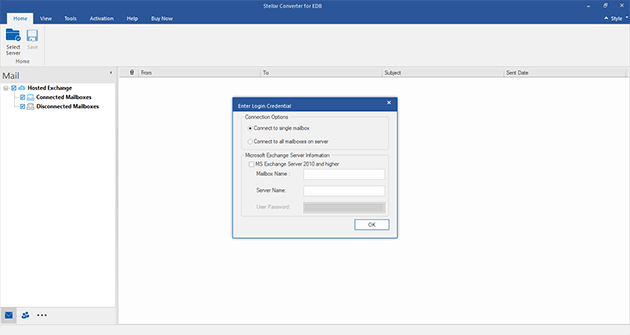
Either a single user mailbox or multiple mailboxes can be simultaneously converted to PST using Stellar Converter for EDB. In case you are choosing mailboxes from an online database, you need to provide the Email, Server Name, and User Password of the Exchange Server.

Preview before Conversion
Prior to carrying out actual conversion, the demo version of the tool shows a preview of the user mailboxes along with their components in a three-view structure. With this software you can preview email messages, attachments, notes, calendar, notes, contacts, and more.

Searches Mail from Converted File
The software allows you to find converted mail items from a single EDB file at a time. You can refine your search result on the basis of 'To', 'From', 'Cc', 'Subject', 'Body', 'Attachment Name', 'Importance', and 'Item Type'. Based on the defined criteria, you can choose: Any Criteria, Exact Match, and Both.

Wide Compatibility:
Crafted with support for all major versions of MS Exchange, this powerful tool is compatible with Windows 10, 8, 7, Vista, 2003 (Server), and XP. Once installed, you can perform conversion of EDB files from MS Exchange 2019, 2016, 2013, 2010, 2007, 2003, 2000, and 5.5 to a PST format.
Online EDB to PST Conversion
Online EDB to PST Conversion is required when one or more user mailboxes are required to be extracted from the running Exchange Server as a PST file without bringing down Exchange. To keep a backup of vital data or for accessibility in times when a connection with MS Exchange Server is not available, EDB file data needs to be converted into an Outlook importable PST file.
Stellar Converter for EDB allows the user to perform online EDB to PST Conversion on the running Exchange without affecting the other users who are currently logged onto the server. In order to convert EDB to PST in the online mode, the user needs to have 'Full Mailbox Permission' for the designated mailboxes.
For Exchange 2010 and 2007 users, there is no need to manually grant Admin Rights and Permissions for accessing user mailboxes. Stellar Phoenix Server Console.exe provides 'Full Mailbox Permission' for the available mailboxes. Just provide the 'Domain Name', 'User Name' and 'Password'. A list of the available mailboxes will appear and the user can add Admin Rights to the desired mailboxes. Once the required permissions are granted, a user can proceed to convert the EDB file to PST.
Offline EDB to PST Conversion
If the Exchange Server is down or unavailable, or there is a need to access data from an archived Exchange database, then, offline EDB to PST Conversion needs to be performed. Upon selecting the EDB file from a recognized drive or volume, the scanning process starts.
In a three pane view, the software will show a preview of the user mailbox items that the user can save as PST file.
Upon completion of the conversion process, a new PST file will be created at a user specified location. Through the 'Import and Export' Wizard, this newly created PST can be imported into Microsoft Outlook.
Sever Console – Converter for EDB
'Stellar Server Console.exe' is a useful application, which comes along with Stellar Converter for EDB for Exchange Server 2010 and 2007 users. The console allows 'Full Mailbox Permission' to the disconnected mailboxes, for users who are using .Net framework 3.5 or above. With an interactive and easy-to-use interface, the tasks can be performed in a hassle free manner without any manual intervention.
The software is compatible with:
Microsoft Exchange Server: 2019, 2016, 2013, 2010, 2007, 2003, 2000, and 5.5
Operating Systems: Windows 10, 8, 7, Vista & Windows Server 2016, 2012, 2008
*Download the free trial version of EDB to PST tool to scan & preview your converted mailbox items as PSTs.
Name: Stellar Converter for EDB
Version: 9.0
Processor: Pentium Class
MS Outlook: 2019, 2016, 2013, 2010, 2007, 2003
Version Supports: Exchange 2019, 2016, 2013, 2010, 2007, 2003, 2000, and 5.5
OS Compatibility: Windows 10, 8, 7, Vista & Windows Server 2016, 2012, 2008
Memory: 2 GB minimum (4 GB recommended)
Hard Disk: 200 MB of Free Space
Testimonials
 Stellar is a perfect amalgamation of quality products and quality services. Never have I come across a data recovery company who follow up individual caseshad lost all Never have I come across a data recovery company who follow up
Michael, United States
read more..


 Installation Steps